How to Remove Watermark from Image Free — Complete Guide 2026
Want to remove watermark from image free? Whether it’s a stock photo logo, text stamp, or brand watermark — CleanImage AI removes it instantly using AI, no signup required.
In this guide, we’ll show you exactly how to remove watermarks from images free in just a few simple steps.
What Is a Watermark and Why Do Images Have Them?
A watermark is a text, logo, or pattern overlaid on an image to protect copyright or identify the source. Stock photo websites like Shutterstock and Getty Images add watermarks to prevent unauthorised use of their images.
Common types of watermarks include:
- Text watermarks (e.g. “Sample”, “Shutterstock”)
- Logo watermarks (brand icons or company logos)
- Pattern watermarks (repeated text across the entire image)
- Transparent watermarks (subtle overlays)
Can You Remove Watermarks from Images for Free?
Yes — with modern AI watermark remover tools, you can remove watermarks from images completely free. AI technology analyses the image, detects the watermark area, and intelligently fills in the background to create a clean, natural result.
CleanImage AI is one of the best free tools available in the UK for removing watermarks from images without any cost or signup required.
How to Remove Watermark from Image Free — Step by Step
Follow these simple steps to remove watermarks from images free using CleanImage AI:
Step 1 — Upload Your Image
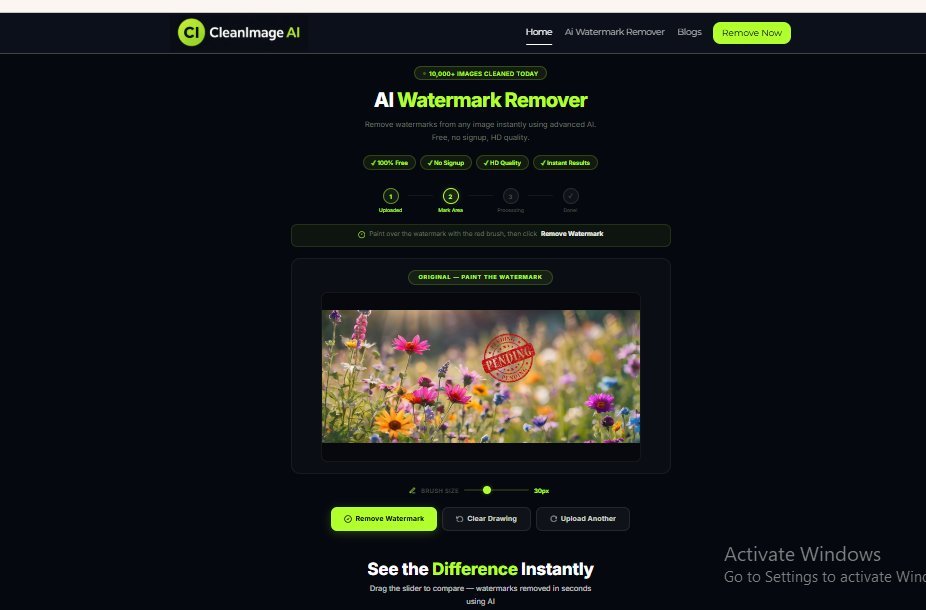
Go to CleanImage AI Watermark Remover and upload your image. You can drag and drop the image, click to browse, or paste directly using Ctrl+V. Supported formats include JPG, PNG, and WEBP up to 10MB.
Step 2 — Paint Over the Watermark
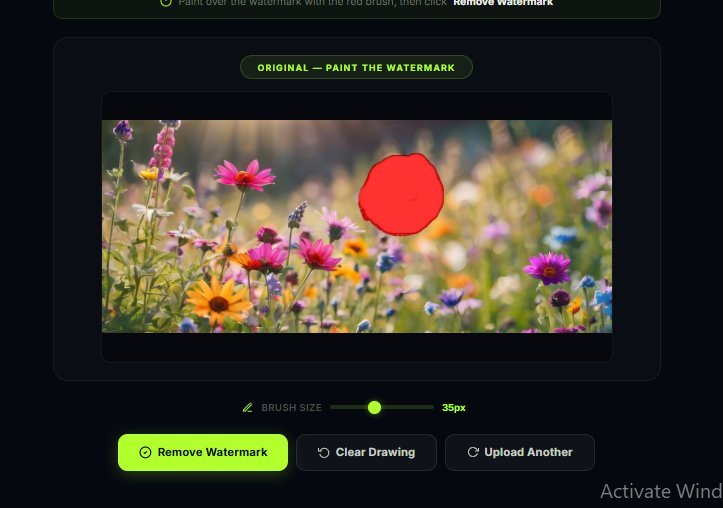
Use the red brush tool to paint over the watermark area on your image. You can adjust the brush size using the slider to cover small or large watermarks precisely.
Step 3 — Click Remove Watermark
Once you have painted over the watermark, click the Remove Watermark button. Our AI will analyse the image and remove the watermark in seconds.
Step 4 — Compare and Download
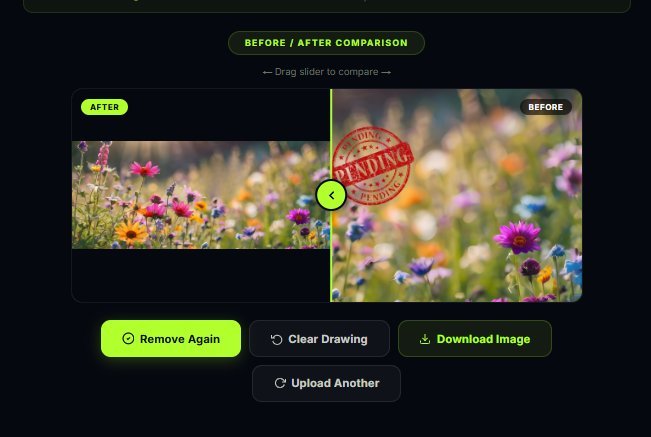
After processing, compare the before and after result using the slider. Click Download Image to save your clean, watermark-free image in HD quality.
Tips for Best Results When Removing Watermarks
- Cover the entire watermark — make sure your brush covers all text or logo pixels completely
- Use a slightly larger brush — going slightly outside the watermark edges helps the AI fill in more naturally
- Use multi-pass removal — if the watermark is not fully removed, paint over the remaining area and click Remove Watermark again
- Work with high-resolution images — higher quality images produce better results
Why Use CleanImage AI to Remove Watermarks?
- ✅ 100% free — no hidden charges or subscription required
- ✅ No signup needed — simply upload and remove watermarks instantly
- ✅ AI-powered — advanced artificial intelligence delivers natural results
- ✅ HD quality output — your downloaded image retains full resolution
- ✅ Fast processing — watermarks removed in under 3 seconds
- ✅ Works on all devices — use on desktop, tablet, or mobile in the UK
What Types of Watermarks Can CleanImage AI Remove?
- Stock photo watermarks (Shutterstock, Getty, Adobe Stock)
- Text watermarks and copyright notices
- Logo and brand watermarks
- Date and timestamp stamps
- Diagonal text patterns
- Semi-transparent watermarks
Remove Watermarks from Any Image — Free Forever
CleanImage AI is committed to keeping watermark removal completely free for everyone in the UK and worldwide. Whether you are a photographer, designer, student, or business owner — you can remove watermark from image free without any restrictions. No daily limits, no watermark added to results, no hidden fees. Just upload your image and get clean, professional results instantly using our free AI watermark remover.
Is It Legal to Remove Watermarks from Images?
This is an important question. Removing watermarks from copyrighted stock images and using them without a licence is illegal in the UK and most countries. However, there are legitimate reasons to remove watermarks — such as removing watermarks from your own images or images you have purchased a licence for.
Always ensure you have the right to use an image before removing its watermark.
Frequently Asked Questions
Can I remove watermarks from images on my phone?
Yes — CleanImage AI works on mobile browsers. Simply open the website on your phone, upload your image, and remove the watermark for free.
Does removing a watermark affect image quality?
Our AI watermark remover is designed to maintain full HD quality. The AI intelligently fills in the background so the result looks natural and clean.
How many images can I process for free?
CleanImage AI is completely free to use with no limits on the number of images you can process.
What image formats are supported?
CleanImage AI supports JPG, PNG, and WEBP image formats up to 10MB in size.
How CleanImage AI Compares to Other Watermark Removers
There are many tools available to remove watermark from image free online, but not all deliver the same quality. Some tools blur the image, leave traces of the watermark, or require you to create an account before you can use them.
CleanImage AI uses advanced AI technology to intelligently analyse and fill in the area where the watermark was — delivering natural, clean results every time. Unlike other tools, CleanImage AI is completely free with no daily limits, no signup required, and no watermark added to your processed image.
Whether you need to remove watermark from image free on your desktop or mobile, CleanImage AI delivers professional results in seconds.
Conclusion
Removing watermarks from images no longer requires expensive software or technical skills. With CleanImage AI, you can remove watermarks from images completely free in just a few clicks — no signup required, no payment needed, and results delivered in seconds.
Ready to remove watermarks from your images? Try CleanImage AI free today and get clean, professional images instantly. CleanImage AI makes it easy to remove watermark from image free — simply upload, paint, and download.
Try CleanImage AI today to remove watermark from image free — no signup, no payment, instant results.